MythTV installation

Installation with Mythbuntu is very straightforward. Boot from CD and the installation hums along. It will ask you a few questions along the way but you can reconfigure pretty much anything afterwards.

One of the nice things in Mythbuntu is that it lets you configure and install proprietary drivers for Nvidia cards and the like right from within the control center.

Networking has been a bit of a hassle though. Mythbuntu installs the Gnome network manager by default which does not honor the settings in /etc/network/interfaces. I had trouble configuring my system with one ethernet card that is configured via DHCP and the other statically. The workaround was to simply uninstall the Network Manager all together. From that point on the config file was in charge and I was a happy man.

auto lo iface lo inet loopback auto eth0 iface eth0 inet static address 10.0.1.10 netmask 255.255.255.0 broadcast 10.0.1.255 network 10.0.1.0 auto eth1 iface eth1 inet dhcp

More information about the subject can be found on http://ubuntuforums.org/showthread.php?t=527365and https://help.ubuntu.com/community/NetworkManager.

Mythbuntu 9.04 is out now, but I have not taken the plunge to upgrade. This may happen in a couple months or so.

[EDIT] I have in the meantime taken time to upgrade to 10.04. Everything went pretty smooth. If you are planning on using mythvideo (I heavily do) then you might like to know about the possible pitfalls that come from using the newly introduced storage groups. In short, storage groups allow you to have your videos in separate directories and/or partitions. So you don’t necessarly need to mess with LVM and the like to get one large continuous block device. Another advantage of SG is that you don’t need to mount the video directory in the same location with nfs or samba on a remote frontend. It now essentially works like TV recordings.

However storage groups are still a work in progress and switching to storage groups will render iso files non playable. I have also experienced a few other glitches such as audio being extremly slow and/or files simply not playing. I tribute that to the internal player being reworked.

MythTV system planning

I’ll be writing up my tips, tricks and configs for my MythTV installation on a Mythbuntu server during the next few days. The first section is dedicated to the requirements of my particular installation while the following ones will focus on particular issues of the installation.

My MythTV box used to be based on a Gentoo system. Beautiful as it was, Gentoo forced me to upgrade this and that here and there, sometimes breaking packages on the way or having unresolved dependencies. This generally is the result of the packages or the ebuilds not being tested well enough. Originally I opted for Gentoo for its superior hardware support. Because Gentoo uses very recent packages, everything is pretty bleeding edge. At the time this was essential getting my hardware to run smoothly. By now though this has changed and Ubuntu supports everything I need minus the headaches when upgrading.

Prerequisite

The hardware section will list specifics about my hardware used and plans for the future.

  • backend server with a dual TV tuner card
  • mythfrontend on server box
  • mythfrontends from collectivity.goof.com on MacBook Pro and MacBook

The frontend that runs directly on the server outputs its signal via an NVidia Geforce 7300 card on the DVI port. I use a DVI-HDMI cable to connect it to my Pioneer PDP-436-XDE HD plasma display.

The card does feature a HDMI output which would of course be nice if I could use it. I could even send audio across that same cable as the XFX Card does also feature an S/PDIF input connector. However I’d never had the nerve to mess with digital audio on my Linux box. Also I guess my xorg.conf would need to be different to address the HDMI out.

I usually use the MacBooks internal display and don’t connect it to a TV and the like.

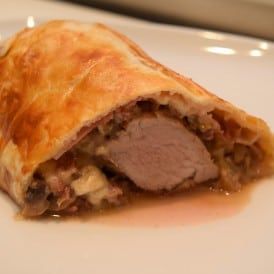
Filet im Teig

Filet im Teig

Schweinsfilet im Teig mit Apfel-Champignon Füllung nach Grosi’s Art.

Filet im Teig

Füllung

  • 1 Stk. Zwiebeln
  • 200 g Speck gewürfelt
  • 150 g Champigons
  • 1 Stk. Äpfel (kräftig, säuerlich)
  • 1.5 dl Bratensauce
  • 1.5 dl Weisswein

Filet

  • 2 Stk. Blätterteig (rechteckig)
  • 6 Scheiben Rohschinken (Parma)
  • 6 Scheiben Gruyère
  • 1 Stk. Schweinsfilet

Füllung

  1. Zwiebel hacken und zusammen mit Speckwürfeln in etwas Butter andünsten und mit Weisswein ablöschen.
    Apfel mit Röstiraffel reiben und mit den in Scheiben geschnittenen Champignons hinzugeben.
    Bratensauce hinzugeben und mit Salz und Pfeffer würzen.
    Auf kleiner Stufe köcheln lassen bis eine sämige Füllung entsteht.

    Vom Feuer nehmen und mit etwas (ca. 1 EL) Cognac abschmecken und auf die Seite stellen.

Filet im Teig

  1. Filet mit Salz und Pfeffer würzen und von allen Seiten scharf anbraten. Auf die Seite legen.
    Blätterteig mit Backtrennpapier auf Blech legen.
    Ein wenig Füllung, 1 Lage Rohschinken und nochmals Füllung. Darauf das Filet legen.
    Das Filet wiederum mit Füllung, Gruyère, Schinken und noch einer Lage Füllung belegen.
    Die restliche Füllung um das Filet herum verteilen.
    Mit dem 2. Blätterteig alles bedecken und darauf achten, dass sich keine zu grossen Luftblasen bilden.

    Den Rand andrücken und einschlagen. Mit Eigelb bestreichen und bei ca. 180°C 30-45 min backen.

Dazu passen verschiedene Salate und ein kaltes Bier.

Das Filet lässt sich gut vorbereiten und anschliessend nur noch im Ofen fertigbacken vor die Gäste kommen.

Rotkraut

Rotkraut als Gemüse zu Wild und Spätzle

Rotkraut

  • 1 Stk. Rotkohl
  • 1 Stk. Äpfel (kräftig, säuerlich)
  • 1 Stk. Zwiebeln
  • 2 dl Rotwein
  • 1 Messerspitze Ingwer (Pulver)
  • 1 EL Apfelessig
  • 1 EL Zucker
  • 1 Messerspitze Zimt gemahlen
  • 1 Stk. Lorbeerblatt
  1. Kraut zerschneiden, die dicken weissen Teile nach Möglichkeit etwas aussortieren.

    Zwiebel hacken und in etwas Olivenöl andünsten.

    Kraut dazugeben und mit Röstiraffel den Apfel hineinreiben. Anschliessend mit Rotwein ablöschen.

    Mit Salz und Pfeffer würzen, die restlichen Zutaten hinzugeben und bei geschlossenem Deckel ca. 30 Minuten köcheln lassen.

Lässt sich gut vorbereiten und portionsweise einfrieren.