Schlagwort-Archiv: GPU

Haswell MythTV Server for 2015

After several years of running my MSI Speedster based MythTV box I decided it was time for an upgrade. Not because the machine failed to handle its duties but because I was simply in the mood of building something new. I have to be clear that from a performance perspective, the Core2Duo Merom chip in the old machine was still fast enough for running MythTV. With the addition of VDPAU video decoding on a dedicated Nvidia card processor usage stayed low even during HD playback.

What has changed in the meantime

Intel’s integrated graphics solution (in my case the HD4600) has greatly improved since the days of the i945 chipset present on the old board. The latter was basically unusable for anything but the most basic of tasks. No dual head, no HDMI sound, no video acceleration. All of the above have been addressed making a dedicated card unnecessary. Not only will this save power but also lower cooling requirements.

Thanks to VAAPI Intel chips can now also do video decoding of the most popular formats in hardware. Haswell can currently do the following:

  • MPEG2 decode
  • MPEG2 encode
  • H.264/AVC decode
  • VC-1 decode
  • H.264/AVC encode
  • JPEG/MJPEG
  • Video Post Processing

Power usage is now down from 78 watts at idle to a mere 25 watts. This should save me about 60 bucks in power bills a year. Not exactly enough to justify the investment but a nice side effect.

Hardware Changes

Processor

From a sheer power perspective a cheapish i3 would certainly be sufficient. But I wanted to have extra horsepower for the future, possibly also running VMware ESXi and so I went with a Haswell 4770S. 4 Cores, Hyperthreading, a low TDP of 65W and a full feature set for virtualization to IGP. When idling the modern processors use no more power than their lower spec cousins.

Mainboard

C’t magazine published an article about a low power (10W) Haswell build. This was inspiration for me and so I also chose to use the Intel DG87RL board even though intel decided to move out of the mainboard business. Aside from using little power, the mainboard also offers all the features I was hoping for:

DVI, Displayport and HDMI outputs, USB3 and a mSata slot and no legacy interfaces.

Intel DH87RL Motherboard

RAM

I chose a single 8GB Kingston Value DDR3 stick.

SSD

Samsung EVO 840 mSATA SSD

Samsung EVO 840 mSATA SSD

Given the Mainboard already contains a mSATA slot I bought a Samsung EVO 840 120GB disk.

Power Supply

My current Corsair PSU still works but does not run with a Haswell build for it does not support the Haswell C7 sleep states. Corsair described the problem like this:

According to Intel’s presentation at IDF, the new Haswell processors enter a sleep state called C7 that can drop processor power usage as low as 0.05A. Even if the sleeping CPU is the only load on the +12V rail, most power supplies can handle a load this low. The potential problem comes up when there is still a substantial load on the power supply’s non-primary rails (the +3.3V and +5V). If the load on these non-primary rails are above a certain threshold (which varies by PSU), the +12V can go out of spec (voltages greater than +12.6V). If the +12V is out of spec when the motherboard comes out of the sleep state, the PSU’s protection may prevent the PSU from running and will cause the power supply to „latch off“. This will require the user to cycle the power on their power supply using the power switch on the back of the unit.

This forced me to also get a new PSU. Maybe a good idea as the Corsair now has quite a few hours on its clock. I opted for a Seasonic Platinum P460. The P400 would have been the better option but was out of stock. I comes with a fully modular cable harness. The only problem I have is a clearly audible hiss from the PSU. It is a fully passive unit relying on convection and airflow within the case to stay cool. Because my Antec P180 (or the newer P183 variant) use a separate chamber for disks and PSU that is set apart from the rest of the case I need to include a fan in this chamber. in the past the PSU fan of the Corsair PSU was responsible for the airflow across the disks and PSU. With the new passively cooled Seasonic P460 I have a need for a case fan in the bottom.

Case Fans

I chose the Noctua Nf-s12a Uln, a 120mm low noise fan that comes already equipped with anti vibration pads and runs between 600 ad 800 rpm.
Software Installation Notes

Read here all my notes

Upgrades to MythTV system

After my system was quietly humming away for years it was time for an upgrade. One part was concerning the storage system whilst the other had to do with my video card.

Storage Upgrade

I remember my very first build having used a 80GB disk for the recordings. A lot has happened in the meantime and capacities are up by orders of magnitude. The sweetspot currently being in the 3-4TB class. Drive storage has continually grown in my system, sometimes by adding an additional drive and in some instances by replacing a couple drives by a newer model of higher capacity. We all know by now that the only thing not having kept up was the speed of the drives. The answer came in the form of SSD drives a few years ago.

The first SSDs hitting the market suffered from the same set of problems that any new technology does in its infancy. Poor reliability paired with high prices and a rather bad support – in this case the operating systems that were not capable of dealing decently with SSDs.

By now most of these problems are gone. While my system would not get a huge performance boost in its normal workload I still liked the idea of having a fast system disk.

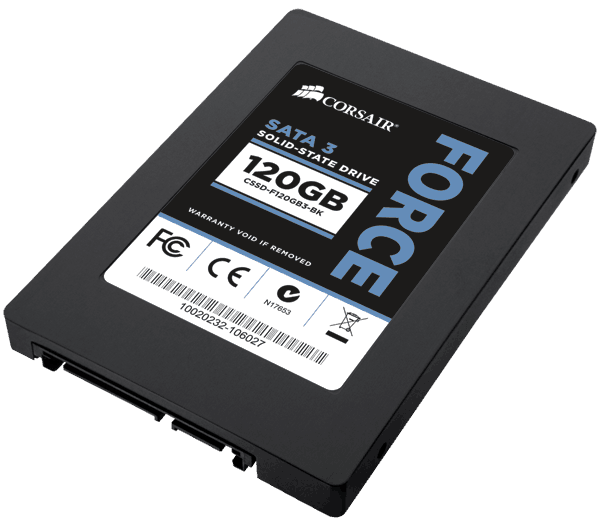
Corsair Force3 SSD

Corsair Force3 SSD 120GB

The upgrade came in the form of  a Corsair SSD with 128GB capacity. So far the system has performed flawlessly. I only have the system run an occasional

# fstrim -v /

to manually force TRIM on my root drive.

Again, I think on a system such as a MythTV backend, an SSD makes little sense. Sure, database acccess is much faster, but with todays amounts of memory that is likely in RAM anyway. And with all recordings and videos sitting on a large conventional disk, there is litte advantage with an SSD. If there’s other workloads of course it may look like a different game alltogether.

What has really dramatically improved is the performance of VMWare. Windows in a virtual machine stresses the hard disk quite a bit. Having a fast disk made a large difference and hence, backing up bluray disks is much more fun.

Graphics Upgrade

My proven GeForce 7200 graphics card suddenly started to behave strangely. At first I thought it was something else because the entire system crashed. Only after quite some digging in log files I realized that it must be the GPU. Hardware failure after all these years 😉

So I was in for new video card. Based on my experience I had the following wishlist:

  • NVidia based card
  • HDMI
  • VDPAU support
  • passively cooled
  • single slot cooler

NVidia because their drivers under Linux have never let me down. They work flawlessly even with my dual monitor/Plasma TV setup. HDMI because I wanted to run digital audio to my TV across that one cable. VDPAU to offload video decoding to the GPU for my 2GHz Core2Duo is not quick enough with heavy HD decoding. Passive cooling is a must because the tiny fans on low end GPUs fail so quickly its not even funny. The single slot cooler simply because I hate to give up a slot for a cooler.

I found everything in the form of the Gigabyte GT-610 minus the single slot cooler. Luckily it only blocks a regular PCI slot that I no longer need since I upgraded to PCIe based DVB-C.

Gigabyte GT610 Video Card

Gigabyte GT610

The card offers HDMI, DVI and a VGA connector.

Installation

Installation under Mythbutu 12.04 was straightforward:

  • deactivate NVidia drivers in Mythbuntu control center
  • remove old GeForce video card
  • drop in new GPU
  • reactivate Nvidia drivers

Because the video cards are so different the use a different set of drivers. Hence it is important to always deactivate/uninstall the one currently in use when upgrading the GPU.

In mythfrontend VDPAU GPU acceleration for video decoding can be turned on in the settings. On my Core2Duo based system this showed a drop in CPU usage for a HD video from close to 200% to roughly 20% CPU usage. No stuttering and perfect quality.

Sound over HDMI

To get the sound to play across HDMI one needs to select the HDA NVidia card in alsamixer by pressing F6. The video card should automatically show up as a new sound device. All that was necessary was to activate the S/PDIF sound in alsamixer.