Schlagwort-Archiv: NVidia

Mythbuntu 14.04.1 on Haswell Machine

Installing Mythbuntu 14.04.1 on my new Haswell i7 / Intel DH87RL box proved impossible due to an annoying audio bug that prevented audio out over HDMI. For this reason I eventually opted to use Ubuntu 14.10 instead of Mythbuntu. Read the installation notes here.

This guide is by no means complete!

For the sake of completness here are my notes for Mythbuntu 14.04.1 with the things that worked.

Individual Installation Steps:

Digital Devices Cine CT V6 DVB-C Card

sudo add-apt-repository ppa:yavdr/main
sudo aptitude install dddvb-dkms

Running MythTV dual headed

As before I run MythTV on my TV set in the living room and have a monitor connected in the Office. Mythfrontend should automatically launch on the TV screen. The monitor is used to display the Linux Desktop.

The Nvidia control panel of the proprietary driver made this very easy. I was in for some fiddling with the Intel graphics. It turns out that this was much easier than I thought. On a

sudo xrandr --output HDMI1 --auto --output HDMI3 --auto --right-of HDMI1

Where HDMI1 is the DVI connector on the DH87RL board and HDMI3 is the HDMI port. HDMI2 would be the display port connector.
This solution is only temporary and lost on relaunch of X. To make it permanent the configuration needs to be written to Xorg.conf. I did not complete the installation to this point as an audio bug prevented me from using Mythbuntu.

Video acceleration VAAPI

Either go the route of installing the standard drivers:

sudo aptitude install libva1 i965-va-driver libva-intel-vaapi-driver vainfo

See here for more info: http://www.mythtv.org/wiki/VAAPI#Configure_MythTV_for_VAAPI

Or Use the

Intel Graphics Installer

The Intel Graphics Installer will keep your system up to date with the latest drivers.

https://01.org/linuxgraphics/downloads

Run the following to install:

sudo aptitude install libc6 libglib2.0-0 libgtk-3-0 libpackagekit-glib2-16 libpolkit-gobject-1-0 libsoup-gnome2.4-1 libsoup2.4-1 ttf-ancient-fonts aptdaemon libproxy1-plugin-webkit

wget --no-check-certificate https://download.01.org/gfx/RPM-GPG-KEY-ilg -O - |  sudo apt-key add -
wget --no-check-certificate https://download.01.org/gfx/RPM-GPG-KEY-ilg-2 -O - | sudo apt-key add -

sudo dpkg -I /home/tv/Downloads/intel-linux-graphics-installer_1.0.7-0intel1_amd64.deb
 The following NEW packages will be installed:
 gir1.2-packagekitglib-1.0{a} libpackagekit-glib2-16 libproxy1-plugin-webkit python3-aptdaemon.pkcompat{a} 
 ttf-ancient-fonts

Running the installer installed the following:

Added:
build-essential:amd64 (11.6ubuntu6)
debhelper:all (9.20131227ubuntu1)
dh-apparmor:all (2.8.95~2430-0ubuntu5.1)
dpkg-dev:all (1.17.5ubuntu5.3)
g++-4.8:amd64 (4.8.2-19ubuntu1)
g++:amd64 (4:4.8.2-1ubuntu6)
i915-3.16-3.13-dkms:all (1)
intel-gpu-tools:amd64 (1.8-1)
libalgorithm-diff-perl:all (1.19.02-3)
libalgorithm-diff-xs-perl:amd64 (0.04-2build4)
libalgorithm-merge-perl:all (0.08-2)
libgles1-mesa:amd64 (10.3.0-0ubuntu2intel1)
libgles2-mesa:amd64 (10.3.0-0ubuntu2intel1)
libllvm3.5:amd64 (1:3.5~svn201651-1ubuntu1)
libmail-sendmail-perl:all (0.79.16-1)
libosmesa6:amd64 (10.3.0-0ubuntu2intel1)
libstdc++-4.8-dev:amd64 (4.8.2-19ubuntu1)
libsys-hostname-long-perl:all (1.4-3)
libva-egl1:amd64 (1.4.0-0intel1)
libva-tpi1:amd64 (1.4.0-0intel1)
po-debconf:all (1.0.16+nmu2ubuntu1)
va-driver-all:amd64 (1.4.0-0intel1)
vdpau-va-driver:amd64 (0.7.3-2ubuntu1.2)

Upgraded:
i965-va-driver:amd64 (from 1.3.0-1ubuntu1 to 1.4.0-0intel1)
libegl1-mesa-drivers:amd64 (from 10.1.3-0ubuntu0.2 to 10.3.0-0ubuntu2intel1)
libegl1-mesa:amd64 (from 10.1.3-0ubuntu0.2 to 10.3.0-0ubuntu2intel1)
libgbm1:amd64 (from 10.1.3-0ubuntu0.2 to 10.3.0-0ubuntu2intel1)
libgl1-mesa-dri:amd64 (from 10.1.3-0ubuntu0.2 to 10.3.0-0ubuntu2intel1)
libgl1-mesa-glx:amd64 (from 10.1.3-0ubuntu0.2 to 10.3.0-0ubuntu2intel1)
libglapi-mesa:amd64 (from 10.1.3-0ubuntu0.2 to 10.3.0-0ubuntu2intel1)
libopenvg1-mesa:amd64 (from 10.1.3-0ubuntu0.2 to 10.3.0-0ubuntu2intel1)
libva-drm1:amd64 (from 1.3.0-2 to 1.4.0-0intel1)
libva-glx1:amd64 (from 1.3.0-2 to 1.4.0-0intel1)
libva-wayland1:amd64 (from 1.3.0-2 to 1.4.0-0intel1)
libva-x11-1:amd64 (from 1.3.0-2 to 1.4.0-0intel1)
libva1:amd64 (from 1.3.0-2 to 1.4.0-0intel1)
libwayland-egl1-mesa:amd64 (from 10.1.3-0ubuntu0.2 to 10.3.0-0ubuntu2intel1)
libxatracker2:amd64 (from 10.1.3-0ubuntu0.2 to 10.3.0-0ubuntu2intel1)
vainfo:amd64 (from 1.3.0-2 to 1.4.0-0intel1)
xserver-xorg-video-intel:amd64 (from 2:2.99.910-0ubuntu1.3 to 2:2.99.911-0intel1)

Downgraded:
libdrm-intel1:amd64 (from 2.4.56-1~ubuntu1 to 2.4.56-1)
libdrm-nouveau2:amd64 (from 2.4.56-1~ubuntu1 to 2.4.56-1)
libdrm-radeon1:amd64 (from 2.4.56-1~ubuntu1 to 2.4.56-1)
libdrm2:amd64 (from 2.4.56-1~ubuntu1 to 2.4.56-1)

Audio

I only get very jaggy audio out over the hdmi connection to my TV. I’ll have to check whether this is due to the cable, TV or the output itself. Interestingly the audio works fine on the displayport out connected to the monitor.

To easily select audio devices and output formats use the pulse audio volume control.

sudo aptitude install pavucontrol

List all audio devices with

aplay -L

Test audio with the following

cat /dev/urandom | aplay

cat /dev/urandom | aplay -D hw:0,3 ## Where 0,3 is your hardware's coordinates

There may be a possibility to upgrade the sound stack:

https://help.ubuntu.com/community/SoundTroubleshootingProcedure

https://wiki.ubuntu.com/Audio/UpgradingAlsa/DKMS

Unfortunately I found out that Mythbuntu 14.04.1 is plagued by an annoying bug that prevents audio over HDMI. The are reports that upgrading the sound subsystem solves this issue but I decided not doing this and using Ubuntu 14.10 instead.
Installation Notes for MythTV on Ubuntu 14.10

Upgrades to MythTV system

After my system was quietly humming away for years it was time for an upgrade. One part was concerning the storage system whilst the other had to do with my video card.

Storage Upgrade

I remember my very first build having used a 80GB disk for the recordings. A lot has happened in the meantime and capacities are up by orders of magnitude. The sweetspot currently being in the 3-4TB class. Drive storage has continually grown in my system, sometimes by adding an additional drive and in some instances by replacing a couple drives by a newer model of higher capacity. We all know by now that the only thing not having kept up was the speed of the drives. The answer came in the form of SSD drives a few years ago.

The first SSDs hitting the market suffered from the same set of problems that any new technology does in its infancy. Poor reliability paired with high prices and a rather bad support – in this case the operating systems that were not capable of dealing decently with SSDs.

By now most of these problems are gone. While my system would not get a huge performance boost in its normal workload I still liked the idea of having a fast system disk.

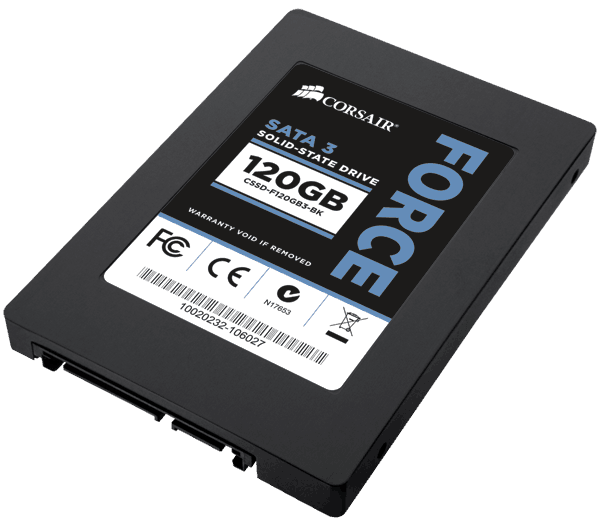
Corsair Force3 SSD

Corsair Force3 SSD 120GB

The upgrade came in the form of  a Corsair SSD with 128GB capacity. So far the system has performed flawlessly. I only have the system run an occasional

# fstrim -v /

to manually force TRIM on my root drive.

Again, I think on a system such as a MythTV backend, an SSD makes little sense. Sure, database acccess is much faster, but with todays amounts of memory that is likely in RAM anyway. And with all recordings and videos sitting on a large conventional disk, there is litte advantage with an SSD. If there’s other workloads of course it may look like a different game alltogether.

What has really dramatically improved is the performance of VMWare. Windows in a virtual machine stresses the hard disk quite a bit. Having a fast disk made a large difference and hence, backing up bluray disks is much more fun.

Graphics Upgrade

My proven GeForce 7200 graphics card suddenly started to behave strangely. At first I thought it was something else because the entire system crashed. Only after quite some digging in log files I realized that it must be the GPU. Hardware failure after all these years 😉

So I was in for new video card. Based on my experience I had the following wishlist:

  • NVidia based card
  • HDMI
  • VDPAU support
  • passively cooled
  • single slot cooler

NVidia because their drivers under Linux have never let me down. They work flawlessly even with my dual monitor/Plasma TV setup. HDMI because I wanted to run digital audio to my TV across that one cable. VDPAU to offload video decoding to the GPU for my 2GHz Core2Duo is not quick enough with heavy HD decoding. Passive cooling is a must because the tiny fans on low end GPUs fail so quickly its not even funny. The single slot cooler simply because I hate to give up a slot for a cooler.

I found everything in the form of the Gigabyte GT-610 minus the single slot cooler. Luckily it only blocks a regular PCI slot that I no longer need since I upgraded to PCIe based DVB-C.

Gigabyte GT610 Video Card

Gigabyte GT610

The card offers HDMI, DVI and a VGA connector.

Installation

Installation under Mythbutu 12.04 was straightforward:

  • deactivate NVidia drivers in Mythbuntu control center
  • remove old GeForce video card
  • drop in new GPU
  • reactivate Nvidia drivers

Because the video cards are so different the use a different set of drivers. Hence it is important to always deactivate/uninstall the one currently in use when upgrading the GPU.

In mythfrontend VDPAU GPU acceleration for video decoding can be turned on in the settings. On my Core2Duo based system this showed a drop in CPU usage for a HD video from close to 200% to roughly 20% CPU usage. No stuttering and perfect quality.

Sound over HDMI

To get the sound to play across HDMI one needs to select the HDA NVidia card in alsamixer by pressing F6. The video card should automatically show up as a new sound device. All that was necessary was to activate the S/PDIF sound in alsamixer.

Hardware

CPU

Most if not all processors these days are fast enough to decode HD videos and do some sharpening if supported by a recent GPU. Running at least one virtual machine adds a bit to the envelope. Also the machine was to be able to rip and re encode Bluray titles along the way. Getting a processor that is clocked higher usually does not mean it runs hotter. Those are merely the samples that tested to be of a better quality. We did not want to overclock the system as this ofter means a higher thermal envelope.

In the end we opted for an Intel Core2Duo Wolfdale E8400 E0, Dual Core, 3.0 GHz, 6MB, FSB1333. This is certainly fast enough even for the more demanding jobs.

CPU Cooler

This is highly dependant on the case I think. As you will see below, we decided to get an OrigenAE S16V case. It almost seems that the Scythe Ninja Mini has been tailored specifically for that case. The PSU fan as well as the 80mm fans on rear suck out air from the case through the Ninja.

Scythe Ninja Mini CPU heatsink

Scythe Ninja Mini

In past projects the Ninja has proven to be very effective with low airflow setups such as this. I can say it works really well having the processor idle at about 40°C.

Mainboard

Gigabyte with its GA-E7AUM-DS2H and Asus‘ P5N7A-VM were the only Intel boards with the new Nvidia GeForce 9400 and 9300 chipsets respectively that looked promising for using in a HTPC setup with HDMI. Most other boards with HDMI had trouble with decoding Bluray material or with sound output across the HDMI cable. From what I found on the net, lots of hope was put into the new Nvidia chips for that and we were not diappointed. Gigabyte simply had a Firewire port to add to the envelope that seemed more useful than Asus‘ Display Port connector. So we opted for this board. So far it has proven rock solid and was a pleasure to work with.

Gigabyte GA E7AUM-DS2H

Gigabyte GA E7AUM-DS2H

The Nvidia chipsets do get quite hot though. Speedfan is reporting between 73°C and 74°C when idle and goes above 80 when decoding a video. By adding a fan to the side of the Ninja, temperatures dropped by about 5-7°C. It’s quite interesting to see that even a tiny bit of indirect airflow can have such a big impact.

RAM

DDR II RAM these days is dirt cheap. We went for 4GB Kingston Value RAM. Because we are using the 32bit version of Windows Vista, we only get to use about 3.4GB.

Optical Drive

The same LG GGC-H20L Bluray combo drive I have in my system is used in his. See below why the choice of the optical drive is not trivial.

PSU

Silentpcreview highlighted the Enermax Modu82+ PSUs as being one of the quietest they’ve ever had. Because the short cables are not an issue no, better yet, desirable in the OrigenAE case we went ahead with it. I can say it truly is very quiet. Even by a solid margin to the already fabulous Corsair HX520W PSU that I am using in my server. The smallest 385W version was used in the system. Anything bigger would be a waste. Nice in that particular setup is the configuration with 3 SATA connectors on the same cable. This allows us to only run one cable to the drive cage with the 3 disks.

Disks

2 Western Digital GP 1TB disks are used in the System as well as a 500GB WD GP. The latter is used for the System and temp files and whatnot while one of the 1TB drives is used for the actual media data i.e. videos, music, recordings etc. The second disk is being used to backup the contents of the first regularly. Once decent SSDs become a bit cheaper it would certainly be a neat option to run the system off one of those and have the big disks sleep when they are not in use.

The Western Digital Green Power disks were chosen for their low energy consumption as well as their low noise. I’ve had Samsung disks that were just as quiet if not even quieter than the WDs while seeking. However Samsung disks tend to vibrate a bit more than the Western Digitals. In the Antec P180 I use for my system, this is not much of an issue because the soft silicone gommets do a fantastic job of isolating vibrations. The OrigenAE case however uses harder gommets that are not as effective, hence the lower vibrations of the Western Digital models come in handy. In addition the Green Power Caviars use less power by a good margin. Even though everyone talks about green computing more important than saving electricity at this point is that less heat is produces that we need to get out of the system. If we can have 3 disks using 15 watts total vs. 30 watts, thats an additional 15 watts that we do not need to cool.

Case

We were looking for a nice looking case with space for at least 3 disks. OrigenAE S16V seemed to offer everything we needed. Support for Full ATX components, 3 disks in a cage with rubber gommets. Unfortunately they are not as soft and effective as the silicone ones on the Antec cases. An additional disk can be mounted on top of the optical drive. However that one will not be cooled very well sitting in its own juices. In the future for a fast SSD for the system this might be an option.

Origen AE S16V case silver

Origen AE S16V case silver

090528_Peach_Windows_HTPC_4 090528_Peach_Windows_HTPC_8

While a nice feature – the second version of the case the S16T that has a small 7″ touchscreen – it seemed too expensive. It would certainly be nice to have every once in a while to select music and quickly schedule a recording. The blue VFD display on the S16V is hardly usable. For one blue is a bad color for any sort of display because of the nature of blue light. It tends to scatter heavily making it hard to read. Secondly the letters are too small to be read from more than a meter away.

ichbinleise.ch recommended a case dampening set made of some sort of special heavy acustic foam and a bitumen lining for the lid. Installation is simple – all of the foam pads are pre cut and have a very strong adhesive surface. The acoustic signature improved significantly with the lining in place. Aluminum cases tend to vibrate easily unlike steel that stays quiet.

With the kit its up there with the best silent steel cases.

When we installed the Gigabyte board and the Ninja cooler, we could see that it was going to be a tight fit with the optical drive. Because of the height and depth of the Ninja there is only a gap of about 15mm between the installed optical drive and the CPU cooler, barely enough to hoock up power and SATA cables. Almost all other Bluray drives from either Sony, Pioneer or Plextor are deeper and would not even fit in that combination.

Fans

All fans are installed. That includes a 92mm fan on the side of the case as well as 2 80mm fans on the back. Include the 80mm fan on the CPU cooler and the PSU fan that makes for a system with 5 fans. Not exactly very few. The fans are models that ichbinleise.ch produces in china to its custom specs. Given their price of just over 6 swiss francs I was surprised how quiet they are and how smooth they run.

I would have opted for some Scythe or Noctua fans but these would have been much more expensive by a factor of 2 or 3 easily.

However all the fans are models with a very low rpm rating. The system is virtually inaudible even from 1 meter away. I can also report that all temperatures stay within sane levels. We will double check again in the summer once it gets up to the 30s outside.

Mission accomplished.

back to overview